
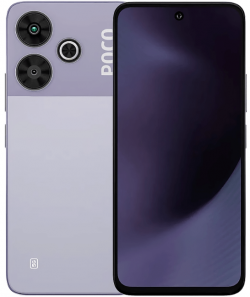
Redmi Note 12R /Redmi Note 12 5G (Sky) F64 Box Full Dump | Dead Boot Repair Tested
Download Redmi Note 12R / Redmi 12 5G (codename sky) full flash file dump created by F64 Box. 100% tested solution for Dead Boot Repair, hang on logo, software corruption, FRP bypass, and hard brick f...
104 views
0 downloads
Available Downloads
Loading files...
Full Specifications
Redmi Note 12R / Redmi 12 5G UFS Dump
| Brand | Xiaomi Redmi |
| Device | Redmi Note 12R / Redmi 12 5G / POCO M6 Pro 5G |
| Codename | sky |
| Chipset | Qualcomm Snapdragon 4 Gen 2 |
| SoC Platform | parrot |
| CPU Architecture | arm64-v8a |
| Storage Type | UFS 2.2 |
| UFS Manufacturer | MICRON |
| UFS Model | MT128GAXAU2U22 |
| Android Version | Android 12 |
| Build Fingerprint | Redmi/sky/sky:12/SKQ1.230118.001/OS2.0.9.0.VMWINXM:user/release-keys |
| Security Patch | 2025-06-01 |
| Build Date | Fri May 30 13:37:39 CST 2025 |
| File Type | F64 Box Full UFS Dump |
| ROM Type | Engineering Service Dump |
| Flash Support | F64 Box / UFI UFS / EasyJTAG Plus / Medusa Pro |
| Working Status | 100% Tested Working |
| Purpose | Dead Boot Repair, UFS Rebuild, Bootloop Fix, FRP Repair, IMEI Security Backup, Software Recovery |
Redmi Note 12R Redmi 12 5G Sky UFS Dump
| Description | Professional UFS dump repair package for Redmi Note 12R and Redmi 12 5G Sky extracted using F64 Box for dead boot repair, unbrick operations, UFS initialization, and advanced software recovery |
| Device Name | Redmi Note 12R / Redmi 12 5G |
| Brand | Xiaomi Redmi |
| Codename | Sky |
| ROM Type | UFS Full Dump |
| Dump Format | LUN UFS Dump |
| Android Platform | Android |
| Chipset Platform | Qualcomm Snapdragon 4 Gen 2 |
| CPU Architecture | 64 Bit |
| GPU | Adreno GPU |
| Memory Type | UFS Universal Flash Storage |
| Read By Tool | F64 Box |
| Compatible Tools | UFI UFS EasyJTAG Plus MIPI Tester Medusa Pro |
| Working Status | Tested Service File |
Main Repair Functions
| Dead Boot Repair | Recover devices with black screen or no power issue |
| Unbrick Solution | Restore soft bricked and hard bricked devices |
| LUN Repair | Repair damaged or corrupted UFS LUN structure |
| Boot Partition Recovery | Restore broken boot partitions and startup files |
| Hang Logo Fix | Repair devices stuck on Redmi logo |
| UFS Initialization | Support new UFS IC initialization after replacement |
| Partition Rebuild | Rebuild damaged Qualcomm partition tables |
| Fastboot Recovery | Fix devices automatically entering Fastboot mode |
Hardware Specifications
| Processor Brand | Qualcomm Snapdragon |
| Chipset | Snapdragon 4 Gen 2 |
| Storage Technology | UFS |
| Flash Interface | Direct UFS Write |
| Connection Method | Direct BGA or ISP Method |
| USB Interface | USB Type C |
| Boot Mode | EDL 9008 Mode |
| Supported Port | Qualcomm HS USB QDLoader 9008 |
| Security Partitions | modemst1 modemst2 fsg fsc persist |
| Repair Category | Advanced Hardware Repair |
Supported Flash Tools
| Primary Tool | F64 Box |
| UFS Tool | UFI UFS Tool |
| JTAG Tool | EasyJTAG Plus |
| Professional Tool | MIPI Tester |
| Additional Support | Medusa Pro |
| Qualcomm Utility | QFIL and UnlockTool |
| ISP Support | Supported |
| EDL Flashing | Supported |
Write Dump Procedure
| Step 1 | Download the RAR package and extract it into a dedicated folder on your computer |
| Step 2 | Connect the original Redmi Note 12R or Redmi 12 5G UFS IC to the Box Flasher socket using Direct BGA method for stable communication |
| Step 3 | Open your UFS repair software and perform Identify UFS operation |
| Step 4 | Backup all original security partitions if the factory UFS is still accessible |
| Step 5 | Save important Qualcomm partitions including modemst1 modemst2 fsg fsc and persist |
| Step 6 | Execute Factory Format or Erase LUNs operation to remove corrupted data completely |
| Step 7 | Open the Write menu and load Descriptor Attributes and all extracted LUN files from the dump folder |
| Step 8 | Start the writing process and wait until progress reaches 100 percent successfully |
| Step 9 | Reinstall the UFS IC carefully onto the motherboard using proper soldering temperature |
| Step 10 | Power on the device and continue with full firmware flashing if the device enters Fastboot mode or vibrates only |
| Step 11 | Flash official Global or matching region firmware using EDL 9008 or Fastboot mode |
| Step 12 | Restore previously backed up security partitions after successful boot to recover IMEI and network functionality |
Technical Notes
| Professional Usage | Recommended for experienced mobile hardware technicians |
| Backup Requirement | Always backup original security partitions before formatting UFS |
| Driver Requirement | Install Qualcomm USB drivers before EDL operations |
| Cable Recommendation | Use high quality USB cable and stable power source |
| Firmware Advice | Use correct region firmware after dump writing process |
| Repair Warning | Incorrect partition writing may cause permanent dead boot |
| Security Warning | Never erase modem partitions without valid backup |
| Disclaimer | All repair and flashing procedures are performed at technician responsibility and personal risk |
Search Tags
| Tag 1 | Redmi Note 12R UFS Dump |
| Tag 2 | Redmi 12 5G Sky Flash File |
| Tag 3 | Sky Qualcomm Dump |
| Tag 4 | Snapdragon 4 Gen 2 Repair |
| Tag 5 | F64 Box Tested File |
| Tag 6 | Dead Boot Redmi Repair |
| Tag 7 | UFS LUN Repair |
| Tag 8 | Qualcomm EDL Flash |
| Tag 9 | Xiaomi UFS Service File |
| Tag 10 | Brick Fix Solution |
Redmi Note 12R /Redmi Note 12 5G (Sky) F64 Box Full Dump | Dead Boot Repair Tested - Description
Download Redmi Note 12R / Redmi 12 5G (codename sky) full flash file dump created by F64 Box. 100% tested solution for Dead Boot Repair, hang on logo, software corruption, FRP bypass, and hard brick fix. This MediaTek dump works perfectly with F64 Box, UFI, or Easy JTAG. Fix your bricked Redmi easily.
Tags:
#RedmiNote12R #Redmi125G #Sky #F64BoxDump #DeadBootRepair #RedmiFlashFile #MTKDump #FRPBypass #SoftwareRepair #XiaomiStockROM #BrickFix
Tags:
#RedmiNote12R #Redmi125G #Sky #F64BoxDump #DeadBootRepair #RedmiFlashFile #MTKDump #FRPBypass #SoftwareRepair #XiaomiStockROM #BrickFix


Comments (0)